Custom Clear Stickers for Product Packaging: A Buyer’s Guide

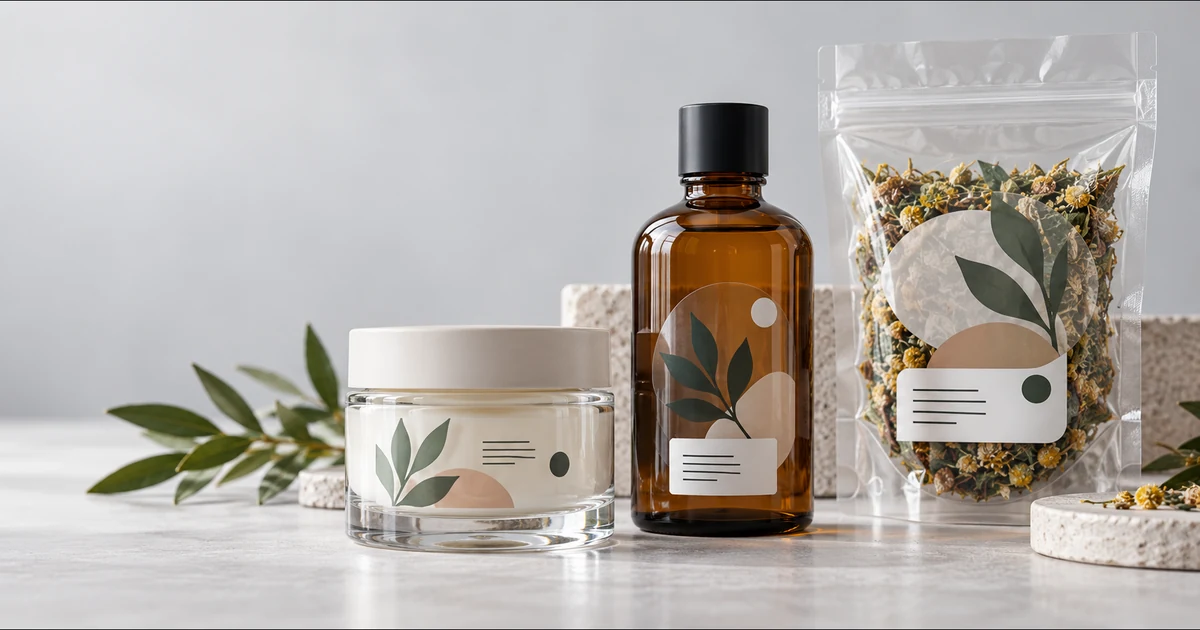
Custom clear stickers are a strong packaging choice when you want the container, product color, or material underneath to remain part of the design. They can give glass jars, bottles, clear pouches, and smooth boxes a clean printed-on appearance without a solid label background.
The best result depends on more than choosing transparent film. Before ordering, decide where the sticker will sit, which artwork areas must stay opaque, how the package will be handled, and whether small text or a barcode needs a solid background.
Key Takeaways
- Choose clear stickers when the package surface should remain visible.
- Use white ink behind important colors or text when the package is dark, colored, or visually busy.
- Measure the real package and test curvature, seams, and usable flat space before ordering.
- Give barcodes and QR codes an opaque, high-contrast background and test the finished package.
- Order against the actual package—not a white-screen mockup alone.
When Do Clear Stickers Work Best on Product Packaging?
Clear stickers work best on smooth packaging where transparency supports the visual idea. Common examples include glass cosmetic jars, beverage bottles, candle containers, transparent food pouches, clear plastic boxes, and polished product cases.
They are especially useful when you want:
- The product or container color to show through
- A logo that appears printed directly on glass or plastic
- A lighter visual footprint than an opaque white label
- One design that integrates with a transparent package
- Selective opaque areas combined with intentional transparency
Clear is not automatically the best choice for every package. If the surface is rough, heavily textured, very dark, flexible, oily, or covered by a low-energy plastic, adhesion and readability need closer testing. An opaque sticker may be safer when every package color must display the artwork in exactly the same way.
For a broader material comparison, start with the custom sticker material buyer’s guide.
Which Packaging Surfaces Are Good Candidates?
The surface should be smooth, clean, dry, and large enough for the sticker to lie flat without crossing a sharp curve, seam, or edge.
| Package surface | Why clear stickers can work | What to test before ordering |
|---|---|---|
| Glass jars and bottles | Creates a clean, integrated appearance | Curvature, condensation, background contrast |
| Clear plastic containers | Keeps the contents visible | Plastic compatibility, flexing, surface treatment |
| Transparent pouches | Preserves a product window | Pouch movement, wrinkles, barcode background |
| Smooth coated boxes | Lets coating or color become part of the design | Contrast, coating compatibility, scuffing |
| Amber or colored bottles | Supports a premium transparent look | White ink placement and color shift |
Package shape matters. A large flat sticker may bridge or lift on a tight bottle curve even when a smaller sticker bonds well. Measure the usable area, not the full front panel, and keep the sticker away from shoulders, hinges, gussets, zipper tracks, and sealing zones.
The clear stickers for glass guide explains surface preparation and placement in more detail.
Do You Need White Ink on Clear Packaging Stickers?
White ink is often the difference between artwork that reads clearly and artwork that disappears into the package. Standard process colors on transparent material are partly translucent, so the container and its contents influence the final appearance.
There are three practical approaches:
- No white ink: best when translucent color is intentional and the background remains light and predictable.
- Selective white ink: place white behind a logo, product name, fine text, or selected colors while leaving the rest transparent.
- Broad white backing: support most printed areas when stronger opacity and consistency matter more than maximum transparency.
Preview the design over the real package color. A pale logo that looks crisp on a white artboard may become weak on amber glass, dark cosmetics, colorful food, or a reflective surface.
See the detailed comparison of clear stickers with white ink versus without white ink before preparing the final file.
How Should You Size a Clear Sticker for Packaging?
Start with the package, not the artwork. Measure the flat or gently curved area where the sticker can sit without touching an edge or moving part. Then print a paper mockup at actual size and place it on the package.
Check five things:
- Can the main logo or product name be recognized at normal viewing distance?
- Does the sticker stay inside the usable flat area?
- Is important text away from the cut edge?
- Does the shape follow the package instead of fighting it?
- Can a customer handle the package without constantly rubbing a critical corner?
A paper mockup will not reproduce transparency or adhesion, but it quickly exposes sizing and placement mistakes. For curved containers, test more than one size before choosing a large run.
How Do You Keep Text, Barcodes, and QR Codes Readable?
Essential information needs controlled contrast. Transparent packaging can show changing colors, shadows, contents, or reflections behind the design, which makes small text and machine-readable codes less predictable.
For text, use a white-ink support area when the background can vary. Avoid very thin letterforms and inspect the design at final printed size.
For barcodes and QR codes, use a solid quiet area and test the finished package with the scanners or phones customers will use. The GS1 2D Barcode Colour & Quality Guide explains that transparent or semi-transparent substrates can interfere with decoding because package contents alter contrast. It recommends an opaque white area with a black 2D code for this situation (GS1, 2025).
Do not rely on a digital mockup as proof that a code will scan. Test after printing and application, under the lighting and viewing angles expected in use.
How Should You Prepare Clear Sticker Artwork?
Keep transparency intentional and production instructions unambiguous. A transparent background means no ink; it does not automatically create white ink.
Prepare the file with:
- The final sticker size and intended cut shape
- Truly transparent areas rather than a white background object
- A clearly labeled white-ink layer or mask
- Bleed where artwork reaches the cut edge
- Critical text and logos inside a safe area
- Vector artwork when possible, or adequate raster resolution at final size
- A production PDF plus a flattened visual reference
Adobe’s current Illustrator guidance separates trim marks, registration marks, color bars, and bleed settings in PDF export. Confirm the exact export requirements with the printer before final delivery (Adobe Illustrator PDF marks and bleeds).
Use the complete clear sticker artwork preparation checklist before uploading your design.
How Should You Prepare the Package Surface?
Apply the sticker to a clean, dry surface. Dust, oil, fingerprints, wax, cleaner residue, and moisture can interfere with the adhesive or remain visible under transparent film.
Avery Dennison’s substrate-preparation bulletin says surfaces should be free of dirt, grease, oil, wax, polish, coatings, and solvent residue before graphic application. It also recommends a clean, soft, lint-free cloth during final preparation (Avery Dennison Instructional Bulletin 1.01).
For your package test:
- Clean the exact production container, not a different sample surface.
- Let the surface dry completely.
- Apply slowly from one edge to reduce trapped air.
- Inspect the label immediately and again after normal handling.
- Repeat the test after exposure to the package’s expected moisture, temperature, and cleaning conditions.
Testing does not create a universal durability guarantee; it helps confirm whether the chosen sticker and package work together for the intended use.
Clear Stickers vs Opaque Stickers for Packaging
Choose clear stickers when integration with the package is the design priority. Choose an opaque sticker when predictable color, maximum text contrast, or complete separation from the package background matters more.
| Decision factor | Clear sticker | Opaque sticker |
|---|---|---|
| Package remains visible | Strong fit | Covered by the label background |
| Color consistency across surfaces | Requires white-ink planning | More predictable starting base |
| Minimal printed-on look | Strong fit | More visibly label-like |
| Small text on changing backgrounds | Needs controlled opaque area | Usually easier to manage |
| Dark or busy package | Selective white ink often needed | Often simpler |
If you are still deciding, compare clear stickers and white vinyl stickers.
Clear Packaging Sticker Ordering Checklist
Before placing an order, confirm:
- The sticker’s main job: branding, product information, seal, decoration, or code
- The exact package material, color, texture, and curvature
- Final sticker size and cut shape
- Transparent, selective-white, and opaque artwork areas
- Readability on the real filled package
- Barcode or QR-code scan test plan
- Surface-cleaning and application method
- A small physical proof or sample when the application is uncertain
Order Custom Clear Stickers for Your Packaging
YourWaySticker clear stickers are designed for glass, bottles, windows, and transparent packaging, with white ink available where important colors or text need stronger opacity. Upload artwork that clearly identifies transparent and white-ink areas, then test the finished design on the real package.
You can also browse the YourWaySticker shop when you need to compare other sticker materials.
Frequently Asked Questions
Can clear stickers go on colored packaging?
Yes, but the package color will influence translucent printed colors. Use selective white ink behind important text, logos, or brand colors when you need stronger opacity.
Are clear stickers suitable for flexible pouches?
They can be, but the pouch material, flexing, wrinkles, sealing zones, and surface treatment affect the result. Test the finished sticker on the actual filled pouch before ordering a large quantity.
Can a QR code be printed on a clear sticker?
Yes, but place it on an opaque, high-contrast area with an adequate quiet zone. GS1 recommends an opaque white background with a black 2D code when transparent packaging would otherwise reduce contrast. Always test the applied code.
Should clear packaging stickers use white ink?
Use white ink wherever opacity or consistent readability matters. Leave areas without white ink only when you intentionally want the package or product to show through.
Sources
Editorial basis: This buyer guide was reviewed by the YourWay Sticker Editorial Team against the current Clear Stickers product description and the primary technical documents below. Product-specific suitability still depends on the submitted artwork and the customer’s actual package surface.
